
Sentinel NCR — Beginner: Raise Clear Non-conformance Records

SENTINEL LEARNING · BEGINNER
Raise Clear Non-conformance Records
Learn to access Sentinel NCR, write factual non-conformance records, preserve evidence and understand owner and reviewer responsibilities.
What is this Sentinel NCR course?
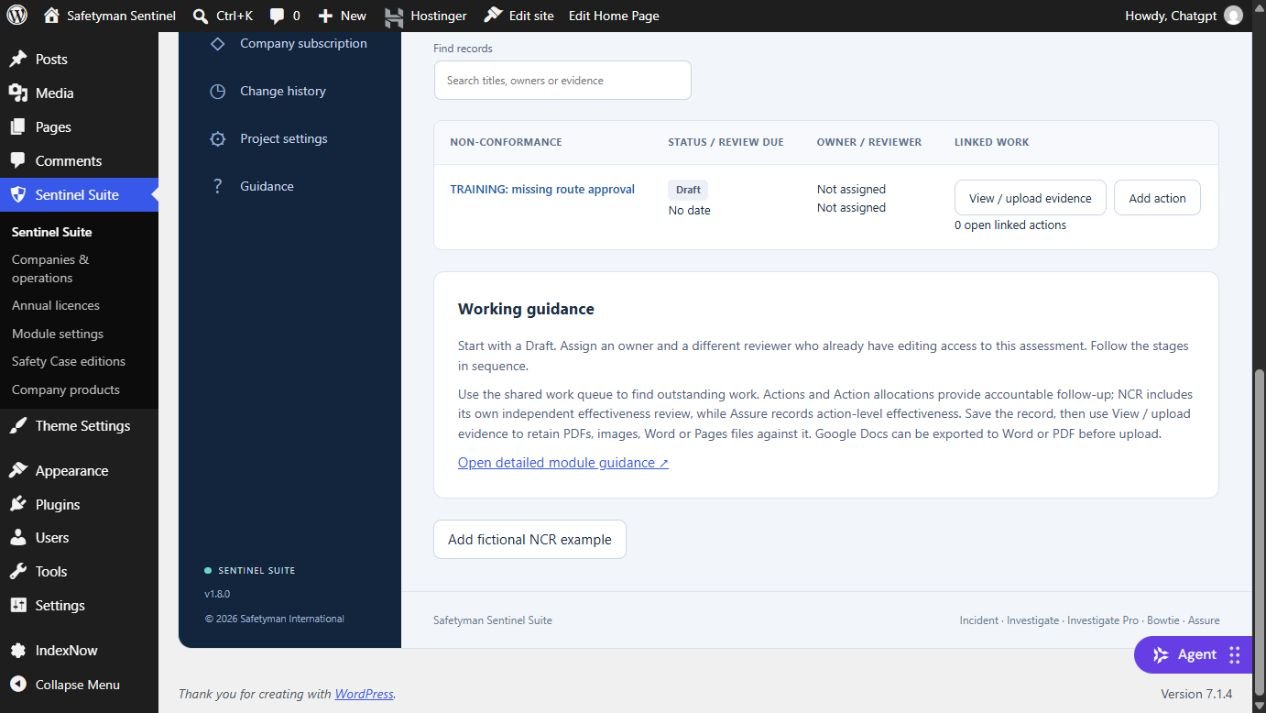
Learn to access Sentinel NCR, write factual non-conformance records, preserve evidence and understand owner and reviewer responsibilities. This self-paced course teaches the Sentinel Suite 1.8.0 web workflow using practical examples, genuine module screenshots and worked answers.
Who is it for?
People who raise or contribute to NCR records, including assessment editors and new module users.
Before you begin
No previous NCR module experience is required. Read the orientation in lesson one.
Your learning journey
- NCR Beginner 1: Understand the workflow and find your workspace — about 25 minutes including practice.
- NCR Beginner 2: Raise a clear draft and preserve evidence — about 30 minutes including practice.
- NCR Beginner 3: Contain the issue and hand over responsibly — about 25 minutes including practice.
Learn at your own pace
Allow approximately 95 minutes including the final assessment. Work in short sessions and return when it suits you. Each lesson includes explanation, a practical exercise and a worked answer. No trainer is required. You can complete all exercises in a notebook without a Sentinel subscription.
Practice, assessment and certificate
Complete three lessons and a separate ten-question single-choice assessment. Each question is worth one point; seven correct answers achieve the 70% pass mark. Review the feedback and revisit the lessons before retrying if needed. Complete the required lessons and pass the assessment to earn the Sentinel course achievement certificate. This records learning, not practical workplace competence, regulatory acceptance or authority to accept operational risk.
Access and scope
Enrolment is allocated by the Academy administrator, in line with the existing Sentinel courses. Using the software requires the appropriate company allocation, permissions, licence and workplace authority. Practise only in an authorised fictional assessment. Later review decisions in the exercises are paper simulations; do not invent evidence or bypass review dates.
Common questions
Do I need access to Sentinel to study?
No. The explanations, screenshots and notebook exercises support study without a software subscription. To practise in the module, you need authorised access to a suitable training workspace.
Does passing qualify me to approve an NCR at work?
No. The certificate records course achievement. Your organisation decides competence, responsibilities and approval authority separately.
Which version does the course cover?
The course covers the Suite 1.8.0 web NCR workflow and assessment-scoped shared work queue. It does not claim to validate a particular desktop installation.
Explore the Sentinel training pathways · Read the NCR operating guide · Explore the fictional NCR worked example
Course content reviewed 31 October 2026. Safetyman Academy. Language: British English.
About Instructor

Course Includes
- 3 Lessons
- 1 Test
- Course Certificate